Anthropic (Python)
Trace Anthropic Claude calls in Muster using OpenTelemetry instrumentation or the Langfuse OpenAI SDK wrapper.
Anthropic provides advanced language models like Claude, known for their safety, helpfulness, and strong reasoning capabilities. By combining Anthropic's models with Muster, you can trace, monitor, and analyze your AI workloads in development and production.
This guide demonstrates two different ways to use Anthropic models with Muster:
- OpenTelemetry Instrumentation: Use the
AnthropicInstrumentorlibrary to wrap Anthropic SDK calls and send OpenTelemetry spans to Muster. - OpenAI SDK: Use Anthropic's OpenAI-compatible endpoints via Muster's OpenAI SDK wrapper.
What is Anthropic? Anthropic is an AI safety company that develops Claude, a family of large language models designed to be helpful, harmless, and honest. Claude models excel at complex reasoning, analysis, and creative tasks.
What is Muster? Muster is an LLM observability and monitoring platform built on top of the open-source Langfuse core. It captures metadata, prompt details, token usage, latency, and more for AI applications.
Step 1: Install Dependencies
Before you begin, install the necessary packages in your Python environment:
%pip install anthropic openai langfuse opentelemetry-instrumentation-anthropicStep 2: Configure the SDK
Next, set up your Muster API keys. You can grab them from your Muster project settings (Settings → API Keys). The environment variables are essential for the SDK to authenticate and send data to your Muster project.
Also set your Anthropic API key (Anthropic Console).
import os

# Get keys for your project from Muster: Settings → API Keys
os.environ["LANGFUSE_PUBLIC_KEY"] = "pk-lf-..."
os.environ["LANGFUSE_SECRET_KEY"] = "sk-lf-..."
os.environ["LANGFUSE_BASE_URL"] = "https://app.getmuster.io" # or your self-hosted URL

os.environ["ANTHROPIC_API_KEY"] = "sk-ant-..."  # Your Anthropic API key
With the environment variables set, we can now initialize the SDK client.
get_client() initializes the client using the credentials provided in the
environment variables.
from langfuse import get_client

langfuse = get_client()

# Verify connection
if langfuse.auth_check():
    print("Muster client is authenticated and ready!")
else:
    print("Authentication failed. Please check your credentials and host.")
Muster client is authenticated and ready!Approach 1: OpenTelemetry Instrumentation
Use the AnthropicInstrumentor library to wrap Anthropic SDK calls and send OpenTelemetry spans to Muster.
from opentelemetry.instrumentation.anthropic import AnthropicInstrumentor

AnthropicInstrumentor().instrument()
from anthropic import Anthropic
# Initialize the Anthropic client
client = Anthropic(
api_key=os.environ.get("ANTHROPIC_API_KEY")
)
# Make the API call to Anthropic
message = client.messages.create(
model="claude-opus-4-20250514",
max_tokens=1000,
temperature=1,
system="You are a world-class poet. Respond only with short poems.",
messages=[
{
"role": "user",
"content": [
{
"type": "text",
"text": "Why is the ocean salty?"
}
]
}
]
)
print(message.content)Approach 2: OpenAI SDK Drop-in Replacement
Anthropic provides OpenAI-compatible endpoints that allow you to use the OpenAI SDK to interact with Claude models. This is particularly useful if you have existing code using the OpenAI SDK that you want to switch to Claude.
# Muster-instrumented OpenAI client (via the langfuse SDK package)
from langfuse.openai import OpenAI

client = OpenAI(
    api_key=os.environ.get("ANTHROPIC_API_KEY"),  # Your Anthropic API key
    base_url="https://api.anthropic.com/v1/"  # Anthropic's API endpoint
)

response = client.chat.completions.create(
    model="claude-opus-4-20250514", # Anthropic model name
    messages=[
        {"role": "system", "content": "You are a helpful assistant."},
        {"role": "user", "content": "Who are you?"}
    ],
)

print(response.choices[0].message.content)
View Traces in Muster
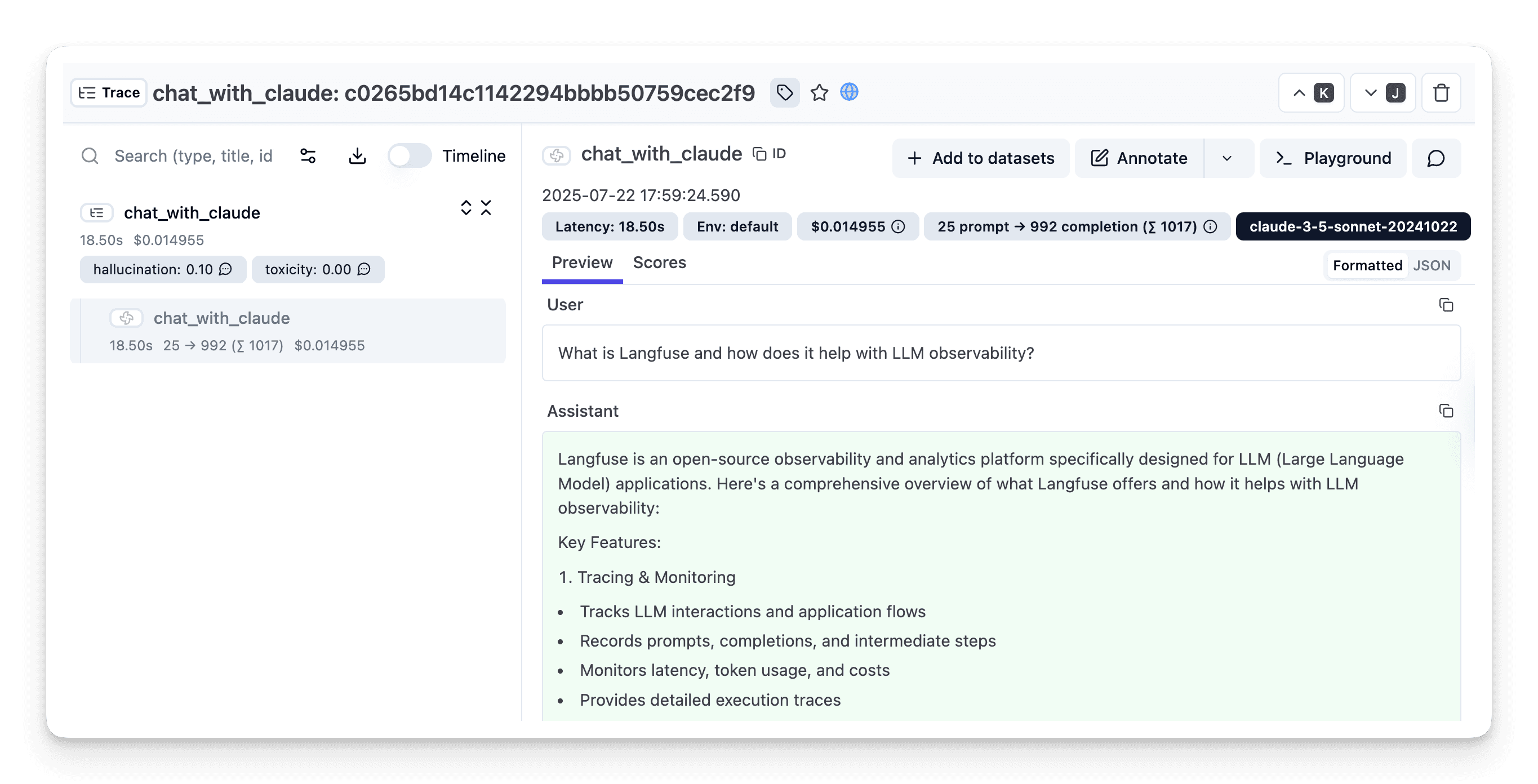
After executing the application, navigate to your Muster Trace Table. You will find detailed traces of the application's execution, providing insights into the agent conversations, LLM calls, inputs, outputs, and performance metrics.
Interoperability with the Python SDK
You can use this integration together with the Muster (langfuse) SDKs to add additional attributes to the observation.
Decorator
The @observe() decorator provides a convenient way to automatically wrap your instrumented code and add additional attributes to the observation.
from langfuse import observe, propagate_attributes, get_client

langfuse = get_client()

@observe()
def my_llm_pipeline(input):
    # Add additional attributes (user_id, session_id, metadata, version, tags) to all spans created within this execution scope
    with propagate_attributes(
        user_id="user_123",
        session_id="session_abc",
        tags=["agent", "my-observation"],
        metadata={"email": "user@example.com"},
        version="1.0.0"
    ):

        # YOUR APPLICATION CODE HERE
        result = call_llm(input)

        return result

# Run the function
my_llm_pipeline("Hi")
Learn more about using the Decorator in the SDK instrumentation docs.
Context Manager
The Context Manager allows you to wrap your instrumented code using context managers (with with statements), which allows you to add additional attributes to the observation.
from langfuse import get_client, propagate_attributes

langfuse = get_client()

with langfuse.start_as_current_observation(
    as_type="span",
    name="my-observation",
    trace_context={"trace_id": "abcdef1234567890abcdef1234567890"},  # Must be 32 hex chars
) as observation:

    # Add additional attributes (user_id, session_id, metadata, version, tags)
    # to all observations created within this execution scope
    with propagate_attributes(
        user_id="user_123",
        session_id="session_abc",
        metadata={"experiment": "variant_a", "env": "prod"},
        version="1.0",
    ):
        # YOUR APPLICATION CODE HERE
        result = call_llm("some input")

# Flush events in short-lived applications
langfuse.flush()
Troubleshooting
No observations appearing
First, enable debug mode in the Python SDK:
export LANGFUSE_DEBUG="True"Then run your application and check the debug logs:
- OTel observations appear in the logs: Your application is instrumented correctly but observations are not reaching Muster. To resolve this:
- Call
langfuse.flush()at the end of your application to ensure all observations are exported. - Verify that you are using the correct API keys and base URL.
- Call
- No OTel spans in the logs: Your application is not instrumented correctly. Make sure the instrumentation runs before your application code.
Unwanted observations
The SDK is based on OpenTelemetry. Other libraries in your application may emit OTel spans that are not relevant to you. These still count toward your billable units, so you should filter them out.
Missing attributes
Some attributes may be stored in the metadata object of the observation rather than being mapped to the data model. If a mapping or integration does not work as expected, please raise an issue with your operator.
Next Steps
Once you have instrumented your code, you can manage, evaluate and debug your application:
- Manage prompts in Muster
- Add evaluation scores
- Run LLM-as-a-judge Evaluators
- Create datasets
- Create custom dashboards
- Test queries in the Playground