OpenAI Agents SDK
Trace the OpenAI Agents SDK in Muster — multi-agent handoffs, tool calls, and grouped runs.
This guide demonstrates how to integrate Muster with your OpenAI Agents workflow to monitor, debug, and evaluate your AI agents.
What is the OpenAI Agents SDK? The OpenAI Agents SDK is "a lightweight, open-source framework that lets developers build AI agents and orchestrate multi-agent workflows."
What is Muster? Muster is an open-source observability platform for AI agents, built on top of the Langfuse core.
1. Install Dependencies
%pip install openai-agents langfuse nest_asyncio openinference-instrumentation-openai-agents2. Configure Environment & Credentials
Set up your Muster API keys (from your project's Settings → API Keys) and your OpenAI key.
import os

os.environ["LANGFUSE_PUBLIC_KEY"] = "pk-lf-..."
os.environ["LANGFUSE_SECRET_KEY"] = "sk-lf-..."
os.environ["LANGFUSE_BASE_URL"] = "https://app.getmuster.io"  # or your self-hosted URL

# Your OpenAI key
os.environ["OPENAI_API_KEY"] = "sk-proj-..."
3. Instrumenting the Agent
import nest_asyncio
nest_asyncio.apply()
Initialize the OpenInference OpenAI Agents instrumentation:
from openinference.instrumentation.openai_agents import OpenAIAgentsInstrumentor

OpenAIAgentsInstrumentor().instrument()
Initialize the SDK client:
from langfuse import get_client

langfuse = get_client()

# Verify connection
if langfuse.auth_check():
    print("Muster client is authenticated and ready!")
else:
    print("Authentication failed. Please check your credentials and host.")
4. Hello World Example
Create an OpenAI Agent that responds in haiku form:
import asyncio
from agents import Agent, Runner

async def main():
    agent = Agent(
        name="Assistant",
        instructions="You only respond in haikus.",
    )

    result = await Runner.run(agent, "Tell me about recursion in programming.")
    print(result.final_output)

loop = asyncio.get_running_loop()
await loop.create_task(main())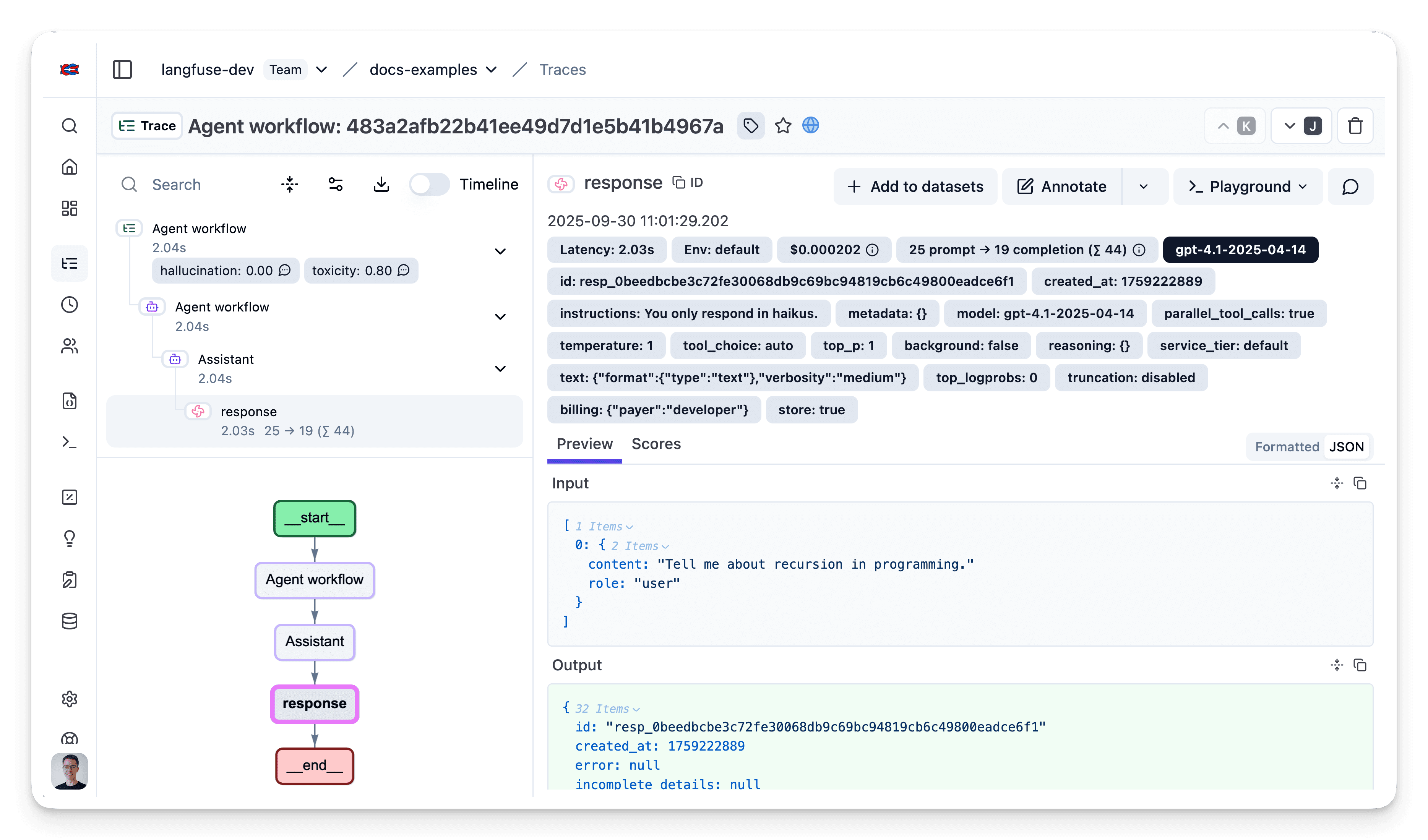
View all sub-spans, token usage, latencies, etc., for debugging or optimization.
5. Multi-agent Handoff Example
Create multiple agents with handoff capabilities:
from agents import Agent, Runner
import asyncio

spanish_agent = Agent(
    name="Spanish agent",
    instructions="You only speak Spanish.",
)

english_agent = Agent(
    name="English agent",
    instructions="You only speak English",
)

triage_agent = Agent(
    name="Triage agent",
    instructions="Handoff to the appropriate agent based on the language of the request.",
    handoffs=[spanish_agent, english_agent],
)

result = await Runner.run(triage_agent, input="Hola, ¿cómo estás?")
print(result.final_output)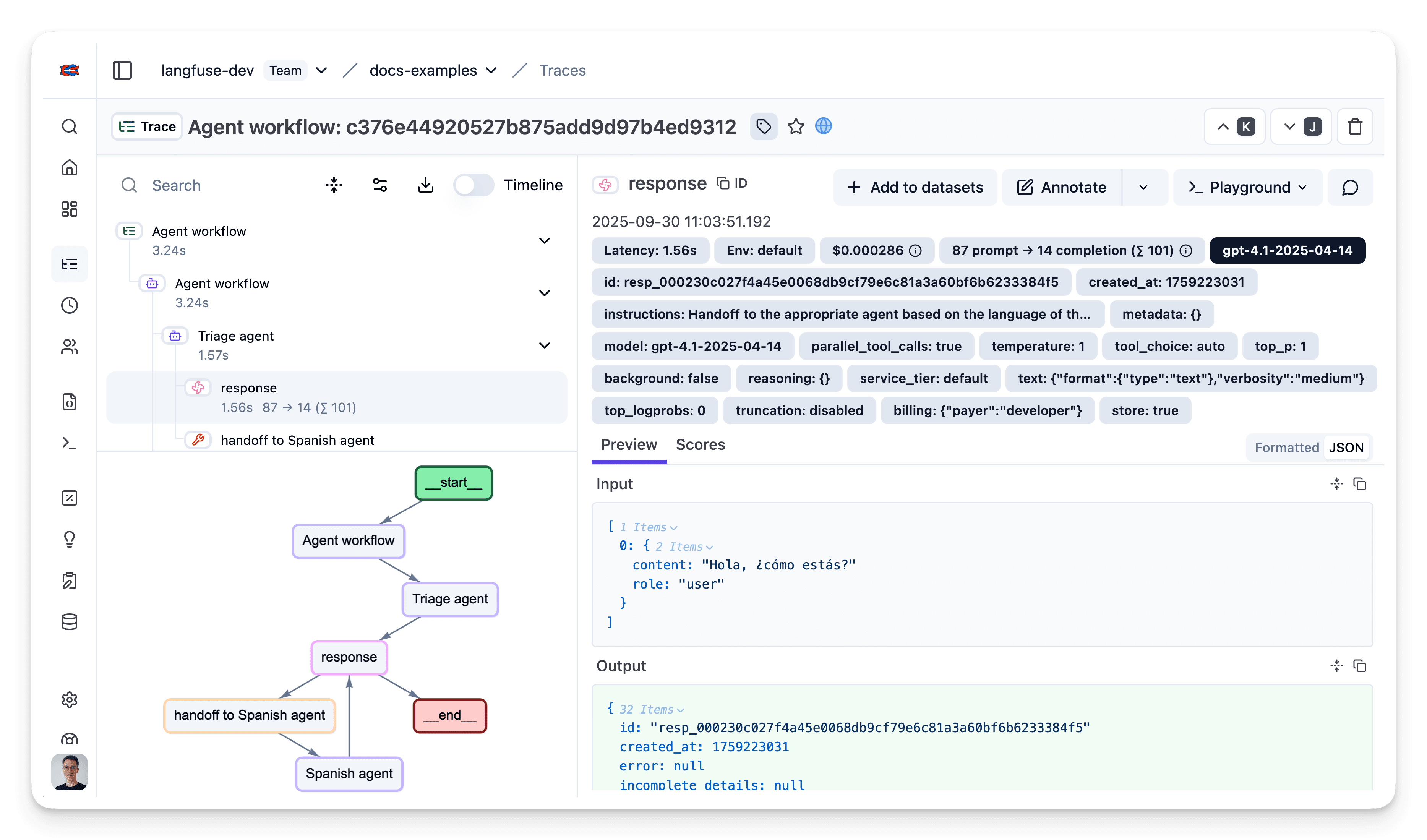
6. Functions Example
The OpenAI Agents SDK allows agents to call Python functions. With Muster instrumentation, you can see which functions are called, their arguments, and return values.
import asyncio
from agents import Agent, Runner, function_tool

# Example function tool.
@function_tool
def get_weather(city: str) -> str:
    return f"The weather in {city} is sunny."

agent = Agent(
    name="Hello world",
    instructions="You are a helpful agent.",
    tools=[get_weather],
)

async def main():
    result = await Runner.run(agent, input="What's the weather in Tokyo?")
    print(result.final_output)

loop = asyncio.get_running_loop()
await loop.create_task(main())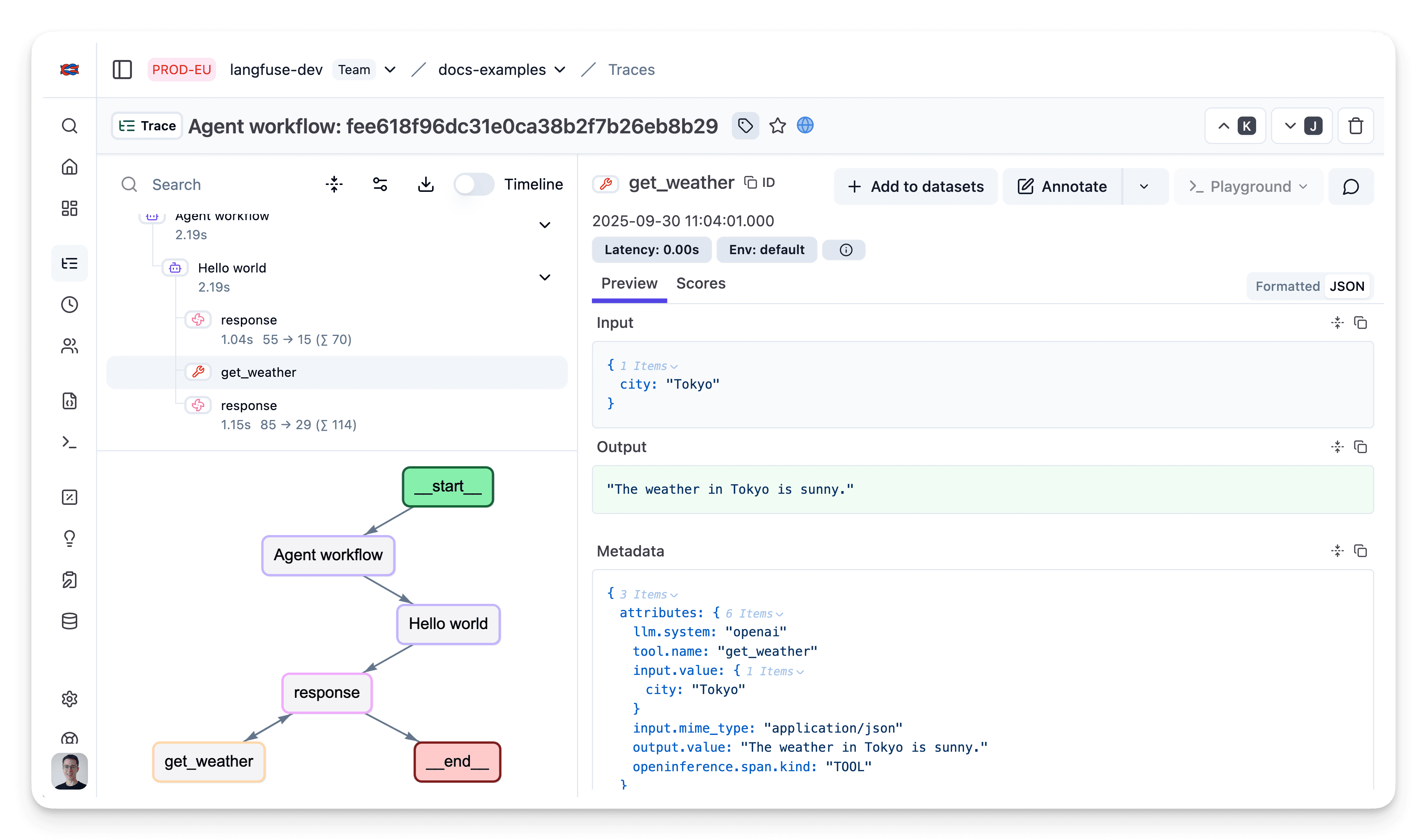
7. Grouping Agent Runs
Group multiple calls into a single trace using the trace(...) context
manager:
from agents import Agent, Runner, trace
import asyncio

async def main():
    agent = Agent(name="Joke generator", instructions="Tell funny jokes.")

    with trace("Joke workflow"):
        first_result = await Runner.run(agent, "Tell me a joke")
        second_result = await Runner.run(agent, f"Rate this joke: {first_result.final_output}")
        print(f"Joke: {first_result.final_output}")
        print(f"Rating: {second_result.final_output}")

loop = asyncio.get_running_loop()
await loop.create_task(main())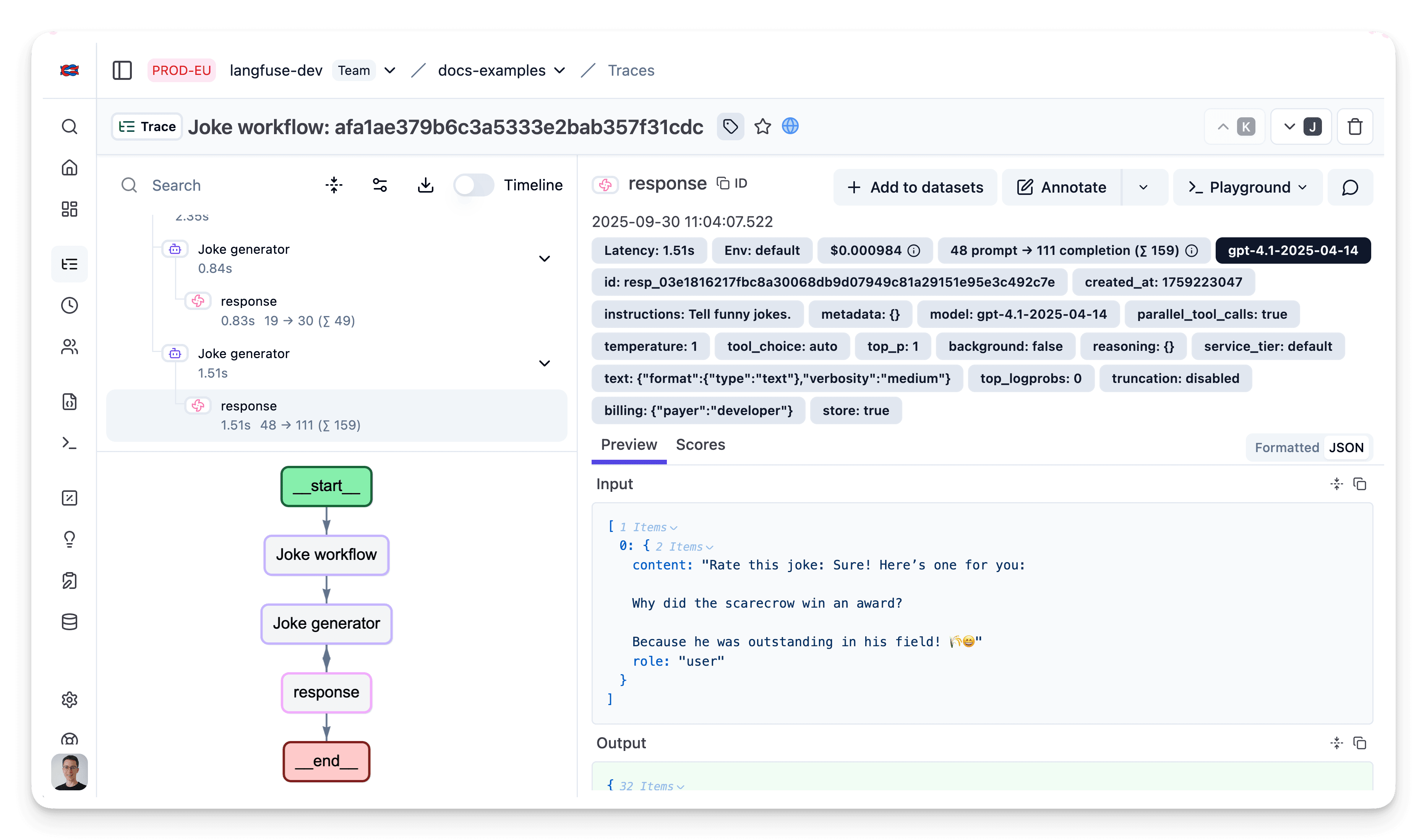
Link Muster Prompts
If you manage your prompts with Muster Prompt Management, link the prompt used to the trace by setting up an OTel span processor.
Limitation: This method links the prompt to all generation spans in the trace whose name starts with the defined string.
from contextvars import ContextVar
from typing import Optional
from opentelemetry import context as context_api, trace
from opentelemetry.sdk.trace.export import Span, SpanProcessor

prompt_info_var = ContextVar("prompt_info", default=None)

class LangfuseProcessor(SpanProcessor):
    def on_start(self, span: "Span", parent_context: Optional[context_api.Context] = None) -> None:
        if span.name.startswith("response"):
            prompt_info = prompt_info_var.get()
            if prompt_info:
                span.set_attribute("langfuse.prompt.name", prompt_info.get("name"))
                span.set_attribute("langfuse.prompt.version", prompt_info.get("version"))


from langfuse import get_client
langfuse = get_client()

trace.get_tracer_provider().add_span_processor(LangfuseProcessor())
from openinference.instrumentation.openai_agents import OpenAIAgentsInstrumentor
OpenAIAgentsInstrumentor().instrument()# Fetch the prompt from Muster Prompt Management
langfuse_prompt = langfuse.get_prompt("movie-critic")
system_prompt = langfuse_prompt.compile(criticlevel="expert", movie="Dune 2")
# Pass the prompt to the SpanProcessor
prompt_info_var.set({
"name": langfuse_prompt.name,
"version": langfuse_prompt.version,
})
# Run the agent ...Interoperability with the Python SDK
Use this integration together with the Muster (langfuse) SDK to add additional attributes to the observation.
Decorator
The @observe() decorator automatically wraps your instrumented code:
from langfuse import observe, propagate_attributes, get_client

langfuse = get_client()

@observe()
def my_llm_pipeline(input):
    with propagate_attributes(
        user_id="user_123",
        session_id="session_abc",
        tags=["agent", "my-observation"],
        metadata={"email": "user@example.com"},
        version="1.0.0"
    ):
        result = call_llm(input)
        return result

my_llm_pipeline("Hi")
Context Manager
from langfuse import get_client, propagate_attributes

langfuse = get_client()

with langfuse.start_as_current_observation(
    as_type="span",
    name="my-observation",
    trace_context={"trace_id": "abcdef1234567890abcdef1234567890"},
) as observation:
    with propagate_attributes(
        user_id="user_123",
        session_id="session_abc",
        metadata={"experiment": "variant_a", "env": "prod"},
        version="1.0",
    ):
        result = call_llm("some input")

langfuse.flush()
Troubleshooting
No observations appearing
Enable debug mode in the Python SDK:
export LANGFUSE_DEBUG="True"Then check the debug logs:
- OTel observations appear in the logs but not in Muster — call
langfuse.flush()at the end of your application; verify your API keys and base URL. - No OTel spans in the logs — instrumentation is not running before your application code.
Unwanted observations
Other libraries may emit OTel spans that are not relevant. They count toward billable units, so filter them out via OTel span processors.
Missing attributes
Some attributes are stored in metadata rather than mapped to the data model. If a mapping does not work as expected, raise an issue with your operator.